
Albion Radar Menu Overview
Explore the Albion Radar menu and learn how to customize player tracking, resources, mobs, bosses, chests, Mists, dungeons, ignore list, overlay position, opacity, and ra...
Jun 19, 2026 · 6 min read
Albion Radar is a Windows overlay for Albion Online that helps players read nearby in-game information faster. Qradar shows nearby players, resources, mobs, chests, dungeons, Mists, Hellgates and alerts in a configurable overlay.
Built for gathering, travelling, scouting and making faster decisions in risky zones.
Albion Radar is a third-party Windows overlay for Albion Online. It organizes nearby in-game information into a readable interface, so you can check what is happening around you without opening multiple menus or losing focus during movement.
The overlay is designed to help with gathering routes, open-world travel, Mist scouting, dungeon checks and general awareness. It does not play the game for you, and it cannot show information that is not available to the client.
Albion Radar is also known as Qradar on our website and subscription pages.
Albion Radar focuses on information that is essential for traveling, gathering resources, and scouting PvP zones. The radar aggregates in-game information into actionable signals so you can analyze a situation faster.
Filters, alerts, and ignore lists help you focus on the next decision: avoid a fight, inspect a dungeon, gather a resource, or move to a safer route.
In Mists, Roads, and open-world zones, the main question is who is close and how much time you have to react.
Gatherers care about resources, enchanted nodes, resource mobs, chests, and avoiding fights while moving between zones.
Albion Radar is useful when you want quick context before committing to a dungeon, Hellgate, or Mist objective.
Albion Online has separate regions. Albion Radar is maintained for current West, East, and Europe server support.
Screenshots and videos show how the Albion Online Radar overlay appears during normal movement, scouting, and gathering. Review the interface, alert style, and screen readability before registering.
Radar view, players, resources, and route information shown directly over gameplay.
Dense resource and player information framed for quick scanning while moving.
Latest posts
Browse public notes from the Albion Radar team.
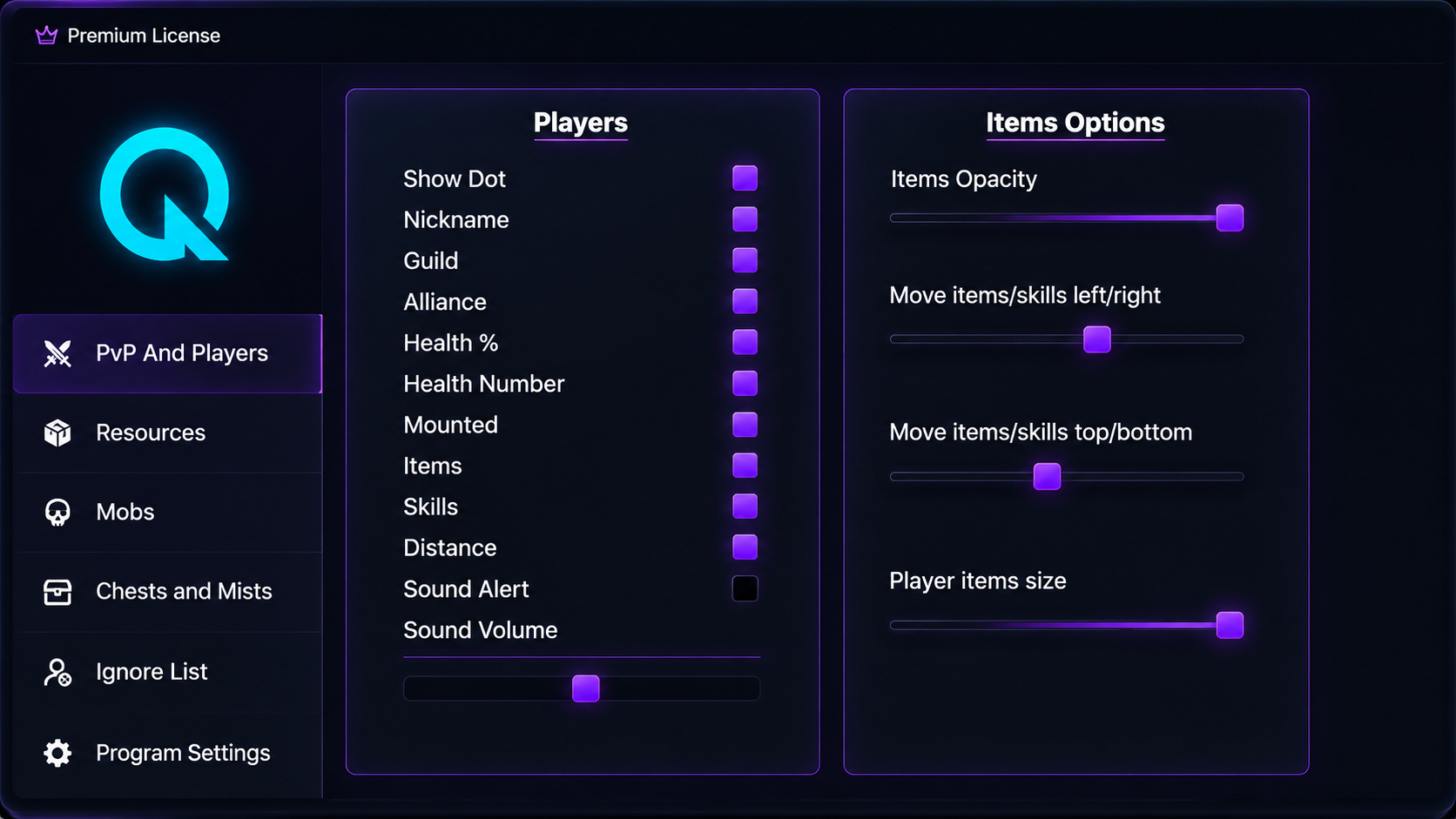
Explore the Albion Radar menu and learn how to customize player tracking, resources, mobs, bosses, chests, Mists, dungeons, ignore list, overlay position, opacity, and ra...
Jun 19, 2026 · 6 min read
Albion Radar is maintained for the current Albion Online regions: West, East, and Europe. The app is built for Windows 10 and Windows 11, with support for the Steam client and the standard Albion Online launcher. Linux, macOS, virtual machines, and custom clients are not supported.
Albion Radar is up to date.
Qradar vs free Albion radar
Free or open-source Albion radar tools can be useful for research, but the practical difference is maintenance, setup help, download clarity, and who is responsible when an Albion Online update breaks compatibility.
Maintained as a private product, with visible compatibility status and update notes after major Albion Online patches.
Public builds or forks can stop working after patches, and users may need to wait for a maintainer or find another fork.
Users can ask about setup, compatibility, refunds, account access, and purchase questions through the support flow.
Support is usually limited to GitHub issues, old comments, community replies, or technical self-troubleshooting.
Download, account access, requirements, screenshots, pricing, and refund notes are kept in one official website flow.
Downloads may be spread across repositories, mirrors, archives, reposts, or forks, so users must verify what is current.
Better for users who want a maintained Albion Radar product with a clearer update and support process.
Better for technical users who want to research public code, experiment, or evaluate open-source projects themselves.
These are the main purchase checks to review before registration and checkout.
Refunds are available when the program cannot launch or the device is not compatible. Activated licenses can still be reviewed, but third-party reseller activation codes are excluded.
When Albion Online receives a major update, the radar is disabled for about 3-5 hours while the Qradar Team updates compatibility. Status updates are posted on Discord.
The application is described as not collecting or storing customer data. It cannot show invisible players and cannot be described as a risk-free third-party tool.
Support is handled by the Qradar Team on Discord, with 24/7 English support for setup, compatibility, and purchase questions.
Read customer reviews on the external FunPay and Trustpilot profiles before buying.
Sources: FunPay Qradar profile and Read customer reviews on Trustpilot
Windows app experience, settings, support tooling, and user-facing interface work.
Low-level performance and efficient data handling for the overlay.
Front-end pages for account access, product information, and support navigation.
Albion Online Radar shows nearby players, mounts, distance, carried items, mobs, resources, chests, dungeon entrances, Mist content, alerts, and configurable filters in a Windows overlay.
Albion Radar is maintained for the current Albion Online regions, including West, East, and Europe. It supports the Steam client and the standard Albion Online launcher on Windows 10 and Windows 11.
Linux, macOS, virtual machines, custom clients, and unsupported launchers are not supported. Ask Discord before buying if your setup is unusual.
In most cases the order does not matter. If a specific version needs a different launch flow, setup notes are shared on Discord.
After purchase, download the program from the account download page, watch the installation tutorial, and follow the setup flow. First launch usually takes up to 15 minutes. Discord and a USB drive or pendrive may be required.
Refunds are available if the program does not launch or is not compatible with your device. Refunds can still be reviewed after activation, except when the activation code was bought from third-party reseller sites.
After major Albion Online updates, the radar is usually disabled for 3-5 hours while compatibility is updated. Current status is posted on Discord.
Support is provided by the Qradar Team on Discord. Support is available 24/7 in English for setup, compatibility, and purchase questions.
The application is described as not collecting or storing customer data. Use the website account and payment flow only through the official Albion Radar website.
Yes. Albion Radar includes ignore lists and display settings so you can reduce noise from allies, guild members, or players you do not need to track.
No. The overlay is limited by the data available to the client. It cannot show information that is not present in available game data.
No third-party Albion Online tool can honestly promise zero risk. Use it at your own risk, keep the app updated, and follow support guidance.
Use the screenshots on the homepage, the buy Albion Online Radar page, the FunPay and Trustpilot profiles, and the linked YouTube videos to review the interface before creating an account.
Use the public buy Albion Online Radar page or the Qradar subscription section on the homepage to compare prices, then register to continue to the purchase flow.
Qradar focuses on maintained compatibility, official downloads, visible product information, refund notes, and Discord support. Free or open-source tools can be useful for research, but they may be abandoned, outdated after patches, or difficult for non-technical users to verify.
Albion Radar organizes nearby in-game information into a readable overlay. It helps you check player activity, resources, enchanted mobs, chests, Mist objectives, and dungeon context without covering the whole screen.
Albion Radar is aimed at Albion Online players who spend time gathering, travelling through risky zones, checking dungeons, or watching for nearby activity.
Compare Qradar subscription prices on the buy Albion Online Radar page, register on the website, choose the plan that matches how long you want access, and ask Discord first if you need setup or compatibility confirmation.
Albion Radar can only work with information available to the client. It does not create server-side visibility, cannot show invisible players, and cannot honestly be described as risk free.
Support is handled by the Qradar Team on Discord in English. After major Albion Online updates, compatibility work usually takes 3-5 hours and status updates are posted on Discord.
After purchase, download the program from the account download page, watch the installation tutorial, and follow the setup flow. Discord and a USB drive or pendrive may be required.